Opus 5.5 makes a claymation in Blender from a single prompt in claude.ai (Alex Albert, X video)
Alex Albert (@alexalbert__) · 2026-09-22 · ai-made · 264,279 views
Made by AI
Model: Claude Opus 5.5
Evidence: Launch-day X post by Anthropic's Alex Albert (2026-09-22): 'I just realized Opus 5.5 can use Blender to make claymations with just a single prompt in claude dot ai now'.
Human role: Single prompt in claude.ai (per the post).
Pipeline: claude.ai + Blender → claymation render (22 s)
What's in the video
Description written by Gemini, which watched and listened to the whole video.
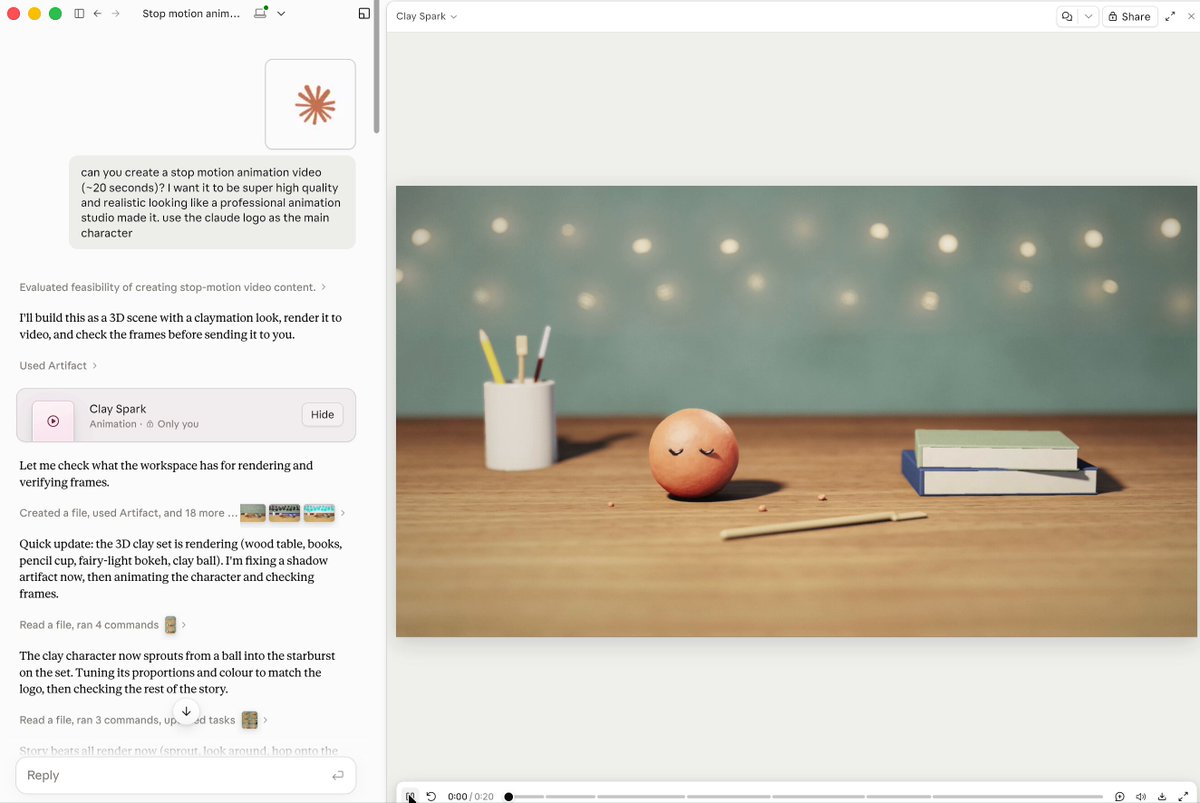
Summary This screen recording, shared by Anthropic developer relations head Alex Albert, demonstrates Claude Opus 5.5 autonomously scripting and rendering a 3D stop-motion claymation video inside the claude.ai interface. From a single user prompt requesting a high-quality claymation featuring the Claude logo, the model sets up a 3D scene, animates the character, renders each frame, and presents the finished 21-second animation in an interactive artifact player titled "Clay Spark."
What is shown
- [00:00]: The user prompt in the left chat panel: "can you create a stop motion animation video with claymation aesthetic. it is super high quality and realistic looking like a professional animation studio created it. use the claude logo as the main character".
- [00:00–00:03]: Claude’s intermediate progress updates and command executions in the chat panel, describing workspace checks, Python scripts, shadow bug fixes, and frame rendering.
- [00:00–00:03]: On the right side, the rendered 21-second video begins, showing a resting peach-colored clay ball with closed eyelids resting on a wooden desk near a pencil, a cup of tools, and books.
- [00:03–00:06]: The clay ball wakes up, sprouts small ears, and transforms into a multi-rayed starburst character modeled after the Claude logo, complete with expressive googly eyes and handmade clay textures.
- [00:07–00:12]: The clay character wiggles its appendages, bounds across the wooden tabletop, and approaches a stack of books.
- [00:13–00:21]: The character hops up onto the books, bouncing happily with shallow depth of field and warm fairy-light bokeh in the background.
Claims & numbers
- Claude: States in the interface, "I'll build this as a 3D scene with a claymation look, render it to video, and check the frames before sending it to you."
- Claude: Mentions rendering specific scene elements including a "wood table, brown pencil, cup, fairy light bokeh" and executing dozens of terminal and Python commands across multiple steps.
- Video player: Displays a finished rendered animation duration of 21 seconds.
Notable quotes
- [00:00] Claude: "I'll build this as a 3D scene with a claymation look, render it to video, and check the frames before sending it to you."
- [00:00] Claude: "Quick update: the 3D clay world is rendering (wood table, brown pencil, cup, fairy light bokeh...)"
- [00:00] Claude: "The clay character now sprouts from a ball into the starburst shape. It then bounces off the table and arrives to watch the logo..."
Assessment
This is an authentic software demonstration showing Claude Opus 5.5 operating inside an agentic code execution environment to model, light, animate, and render a complete 3D scene to video. While the rendering process itself is compressed into a pre-rendered artifact video playback in the recording, the chat history accurately reflects Claude's autonomous multi-step script generation and tool execution.
Lyrics & themes
- Instrumental / Silent: The video is a screen recording with no audio track or dialogue.
- Themes: Transformation, playfulness, and awakening—an inert lump of clay comes to life, adopts the shape of the Anthropic spark symbol, and playfully explores a workspace.
Lore & references
- Claude Spark / Logo: The clay character transforms directly into the iconic multi-pointed sunburst/asterisk emblem of Anthropic's Claude.
- Claymation aesthetic: Emulates classic physical stop-motion animation (reminiscent of Aardman Studios), incorporating tactile clay thumbprints, stepped frame rates, and physical desk props.
- Claude Artifacts / Agentic Coding: Highlights the evolution of Claude artifacts from simple front-end code to complex programmatic rendering pipelines running Python/Blender scripts.
Visual style & craft
- Style: Split-pane claude.ai interface on the left and the embedded video player on the right.
- Craft: The rendered animation features clay surfaces with visible thumbprints, soft subsurface scattering, tactile material deformation, stepped stop-motion timing (animating on "twos"), and realistic cinematic lighting with soft lens blur and fairy-light bokeh.
Described by gemini-3.8-flash on 2026-10-05 from the video's audio and frames.