Build an App With Claude Design
Claude · 2026-10-02 · official · 133,869 views
What's in the video
Description written by Gemini, which watched and listened to the whole video.
Summary
Anthropic designer Nate demonstrates how he uses Claude Design to quickly explore UI concepts and build prototypes for a personal project. He shows how Claude generates design options alongside existing repo code, accepts direct comments and visual edits, generates interactive click-through prototypes, and begins writing code.
What is shown
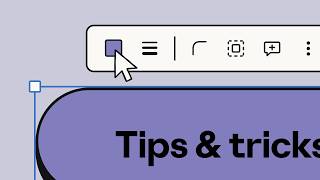
- [00:05] Title card: "How an Anthropic designer uses Claude Design", demonstrating canvas styling controls.
- [00:18] Nate introducing his side project ("Today's Thing") and explaining the need for an onboarding flow.
- [00:42] Claude interface (Claude Code / Artifacts) selecting the project repo (
todays-thing) and navigating to Artifacts -> Design (Beta) alongside Docs and Slides. - [00:50] Prompting Claude using Sonnet 5.5 Medium: "design a silly onboarding for this silly app. start from what we have currently, and do a series of designs for new ideas".
- [00:59] Claude Design generating a canvas with four artboard variations ("The dare", "Bird mode", "Terms & conditions", "Spin to meet today's thing").
- [01:01] Adding canvas comments to guide changes ("@Claude Bigger bird. Much bigger. It should be uncomfortable.").
- [01:06] Nate manually editing copy, layout, and visual styles directly inside the canvas inspector.
- [01:13] Prompting Claude to generate an interactive click-through prototype ("I like bird mode. make me a click-through prototype of it so I can feel the whole flow").
- [01:20] Testing the playable interactive prototype on canvas (
Prototype.dc.html) through a multi-step user onboarding flow. - [01:26] Nate issuing the command "ok claude. build it.", transitioning the design straight into Claude Code generation.
- [01:37] Anthropic tagline: "Claude makes it. You steer it."
Claims & numbers
- The presenter claims Claude Design allows creators to perform rapid "design spikes" by inspecting existing codebases and generating multiple artboard alternatives.
- Claude Design supports interactive click-through prototyping (
Prototype.dc.html) that can be tested directly on the canvas or in full screen. - UI indicates Claude Design, Docs, and Slides are in Beta and powered by Claude Sonnet 5.5 Medium.
Notable quotes
- [00:18] "Hi, my name is Nate. I'm a designer at Anthropic, and here's how I use Claude Design for my own personal projects."
- [01:13] "Then I ask Claude to make a click-through prototype, get another coffee, come back, and see what we got."
- [01:29] "So next time you're about to code something and you want to spend a little bit more time considering the design, try collabing with Claude on it."
Assessment
This is an official Anthropic product demonstration video showing Claude Design and its integration with Claude Code and Artifacts. The workflow is presented via a polished screen capture and real software UI, with time skips edited for brevity (such as coffee breaks while the model generates).
Described by gemini-3.8-flash on 2026-10-07 from the video's audio and frames.