Opus 5.5 motion-graphics workflow: reference videos, HyperFrames/Remotion, 21st.dev, storyboards
Rexan Wong (@rexan_wong)X632,018 views as of 11 October 2026
Why it is here
Listed in github.com/athemeroy/awesome-claude-5-5-videos (docs/library.md). ~632k views: a six-step ‘how to get pro motion graphics from Opus’ thread arguing the default Opus look comes from missing references and context.
Description
Description written by Gemini from the videoGemini 3.8 Flash, 11 October 2026
Summary
Rexan Wong showcases a curated motion-graphics and launch-video workflow leveraging Claude Opus 5.5, code-to-video tools, and component libraries. The video tours an index of startup launch videos from X, inspects an Opus 5.5 prompt template and storyboard interface in a launch video library, and browses UI card elements on 21st.dev.
What is shown
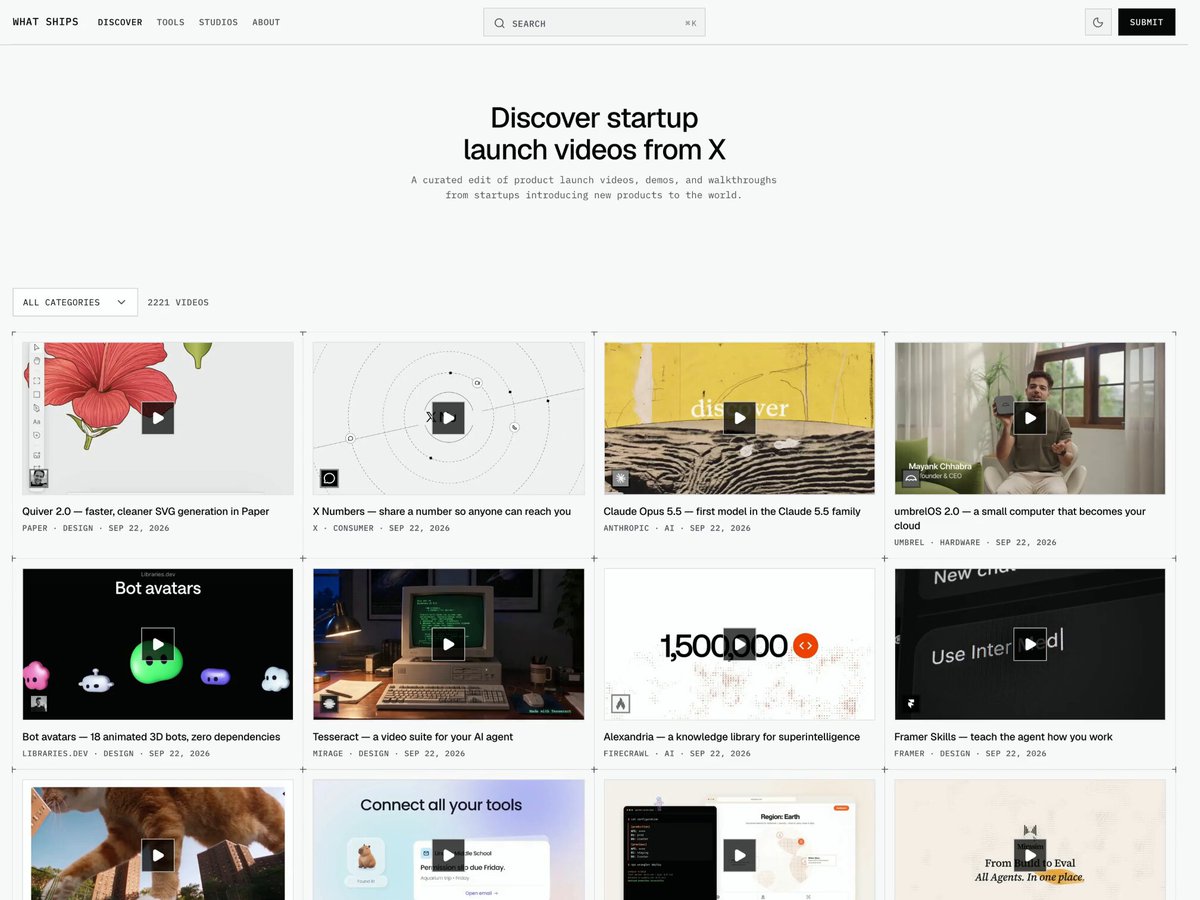
- [00:00 - 00:04]: Browsing a curated site titled “Discover startup launch videos from X” cataloging 2,221 startup launch videos and demos across categories.
- [00:05 - 00:07]: Viewing an entry in X Library for “Opus 5.5 introduces itself, curious, rigorous, candid” alongside a prompt pane with a reusable paste-ready prompt (“Make a 28-second 16:9 product launch video for [PRODUCT NAME]… in the style of ‘Opus 5.5 introduces itself’. Kinetic typography, 120BPM tempo sync, 5 acts…”), storyboards, and HTML/JS code tabs, with references to HyperFrames and Claude Motion Designer.
- [00:08 - 00:10]: Browsing 21st.dev’s Tailwind/React component library specifically filtered to card UI components (466 items shown) used for assembling motion graphics and dashboard layouts.
Claims & numbers
- The startup launch video directory indexes 2,221 videos [00:00].
- The prompt specifies a 28-second 16:9 product launch video synced to a 120 BPM tempo across 5 acts (hook, problem, product reveal, proof, CTA) [00:05].
- The X Library interface displays 818 launch videos and 100 HyperFrames [00:05].
- The 21st.dev card section lists 466 card components [00:08].
Notable quotes
- “Make a 28-second 16:9 product launch video for [PRODUCT NAME] [tagline]… in the style of ‘Opus 5.5 introduces itself’.” [00:05]
- “Recording your screen is easy.” [00:07]
Assessment
Real workflow demonstration and tooling tour; screen recording navigating real web applications and prompt templates without exaggerated performance claims.
Lyrics & themes
- Silent / no audible lyrics or spoken dialogue; the video is an unvoiced screen walkthrough.
Lore & references
- Opus 5.5 launch video style: References the kinetic typography and graphic design aesthetic popularized by Anthropic’s Claude Opus 5.5 release demos (“curious, rigorous, candid”).
- HyperFrames / Remotion: Web-to-code video rendering frameworks that convert programmatic React/HTML/CSS animations into exported MP4 videos via LLM prompts.
- 21st.dev: An open component library frequently used by AI coding agents to source sleek, modern UI components for landing pages and video graphics.
Visual style & craft
A high-resolution screen-capture screencast recording a web browser navigating three platforms: a launch-video aggregator, an AI video prompt library with embedded code players, and 21st.dev UI component cards. The embedded videos featured within the UI display code-rendered geometric shapes, bold flat color blocks, and kinetic text.
Described by gemini-3.8-flash on 2026-10-11 from the video’s audio and frames.
Made by AI
- Made with
- Claude Opus 5.5
- How we know
- X post (2026-09-26): ‘here’s how to generate pro level motion graphic videos w/ opus’ with the attached video
- Human role
- Human picks reference videos, supplies brand assets and screenshots, chooses among 3 storyboards and gives director notes; Opus writes every scene as code.
- Pipeline
- Reference video (whatships.com) + brand assets → Opus 5.5 storyboards → HyperFrames or Remotion code → mp4
- Series
- Code-rendered film (LLM writes the program that draws every frame)